
Skip to content
AI PDF Reader · Android & Windows

Read. Highlight. Master what you read.

Boodfy is an AI PDF reader for Android and Windows that turns your highlights and notes into quizzes and flashcards. It is offline-first: your books, highlights, and notes stay on your device.

  • Offline-first
  • Your files stay on your device
  • 6 languages
  • Optional AI with your own key

Latest release v1.0.8published Nov 24, 2026GitHub

See how it works
  • Faithful PDF & Reflow mode
  • Color highlights
  • Notebook with #1 #2 chips
  • AI-powered quizzes
  • Cloze Cards
  • Daily reading streak
  • 100% local & offline-first
  • 6 native languages
  • 60–120 fps scrolling
  • Desktop book shortcuts
  • Interactive Table of Contents
  • Local Ollama support

Active study workflow

From PDF to mastery in 5 steps

Boodfy turns every PDF into a complete loop of fluid reading, linked notes, and chapter-level retention.

  1. Step 01Hybrid reader

    Open your PDF.

    Import local files or folders and switch seamlessly between original PDF rendering and Fluid Text (Reflow) mode with custom font size and spacing.

  2. Step 02Highlighter

    Highlight in color.

    Mark key passages with a smooth thematic color palette without sluggish text rendering.

  3. Step 03Active notebook

    Take linked notes.

    Write summaries in your notebook and connect each thought with numbered chips (#1, #2…) that flash the source passage.

  4. Step 04Active Recall

    Generate quizzes & flashcards.

    Convert excerpts and chapters into multiple-choice questions and Cloze Cards using the offline engine or AI.

  5. Step 05Mastery stats

    Track your mastery.

    Read detailed explanations, review mistakes, and monitor your accuracy rate across every chapter.

Interactive features

Everything a serious reader needs. And what no other app does.

Try each feature right inside the cards below — from Reflow layout to chip-linked highlight flashes.

Android · Windows

Hybrid PDF & Fluid Text (Reflow) reader

Switch between original PDF rendering and reformatted Fluid Text with A-/A+ font sizing, spacing controls, and theme-adapted PDF colors on Android and Windows.

Original PDFReflow
Chapter II — The Green House

Original rendering preserves columns, formulas, and diagrams. Fluid Text (Reflow) mode reorganizes paragraphs into a clean single column tailored to your screen.
Android · Windows

Instant 4-color highlights

Highlight directly in Original PDF or Fluid Text with numbered chips (#1, #2, #3), instant Add Note / Undo toast, and quick edit popover.

Each color maps to a purpose: definition, example, open question, or summary.
Android · Windows

Synced notebook with pointers

Notebook and Highlights tabs with pointers (Highlight #1 · Pg. X ↗) that jump to the exact page and pulse the linked passage.

Chapter summary

Review the core thesis in and the practical case in

#1 Core thesis: studying with questions locks in far more than passive underlining.

#2 Example: 5 questions per chapter pinpoint exactly what needs another look.

Android · Windows

Cloze Cards & Active Recall

Turn key sentences into fill-in-the-blank Cloze Cards and multiple-choice questions for rapid review.

Android · Windows

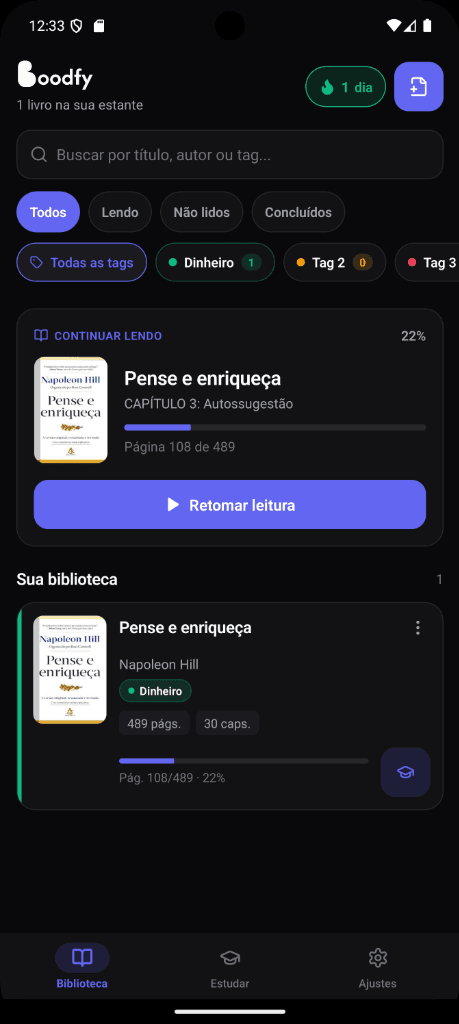
Smart library & custom tags

Auto page-1 covers, automatic PDF author extraction, Continue Reading card, title/author/tag search, and colored tags (8 colors on desktop).

Const. Law74%
Dom Casmurro64%
Calculus Vol. 148%
Systems Design91%
4 books shown
Android · Windows

Daily reading streak

Consecutive reading days counter on Android and Windows to turn deep reading into a steady daily habit.

12consecutive reading days
Android · Windows

6 native languages

Complete UI and quizzes (offline & AI) in 6 languages with instant switching on both Android and Windows.

Portuguese, English, Spanish, French, Hindi, and Chinese
Windows

Desktop book shortcuts

Create Windows desktop shortcuts using the book's own cover and Boodfy badge to reopen right on your last page.

Windows

Anti-sleep, focus mode & bookmarks

Your display stays awake on Windows alongside two-page spread, full screen, and 4-color bookmarks with titles and notes.

Display stays awake while reading
  • Ch. 3 · Core conceptp. 58
  • Ch. 7 · Formulasp. 119
  • Review before examp. 184

Live Study Mode

Try Study Mode right now

Active recall is the fastest way to retain what you read. Switch between the Offline Engine and AI Engine and answer the sample questions below.

Reading excerpt · Chapter 114

When you read a technical book straight through without pausing, page fluency creates a false sense of mastery. In contrast, the testing effect shows that attempting to recall a concept without looking strengthens memory pathways far more than rereading the same passage. Moreover, splitting study by chapter and reviewing mistakes immediately with explanations keeps misconceptions from sticking across the rest of the book.

Study note on active learning

Interactive sample demo — no live AI API call is made here.

Question 1 of 3
Fill in the blank (Cloze): The _____ effect shows that attempting to recall a concept strengthens memory.

Bring Study Mode to your own PDF library.

Android & Windows

A Boodfy for every reading moment

Full core parity across mobile and desktop (Fluid Text, highlights, synced notebook, 6 languages, and 3 themes) plus tailored power features on each device.

Boodfy Android — Smart library & custom tags

Built to read and review anywhere.

  • Hybrid reader: switch between faithful PDF rendering and Reflow mode on small screens
  • Color highlights and synced Notebook with numbered chips (#1, #2) and visual flash
  • Study Mode with strict chapter slicing, multiple choice, Cloze Cards, KPIs, and attempt history
  • Offline quiz engine + optional AI (Gemini, OpenAI, Groq/Llama 3, or local Ollama)
  • Smart library with colored tags, Continue Reading card, daily streak, and 60–120 fps scrolling
  • 6 native languages, 3 themes (Dark AMOLED, Light, Sepia), and expo-secure-store encryption
Get it on Google Play
Factual feature comparison between Boodfy Android and Boodfy Windows
FeatureAndroidWindows
High-performance PDF readerYesYes
Fluid Text / Reflow mode (A-/A+ font & spacing)YesYes
4-color visual highlights (#1, #2, #3…)YesYes
Synced notebook with pulsing highlight jumpYesYes
4-color bookmarks (title, note & quick jump)NoYes
Two-page view, thumbnails, focus mode & full screenNoYes
Interactive TOC with per-chapter quiz buttonNoYes
Theme-adapted PDF colors & live Appearance T popoverNoYes
Offline quiz engine in all 6 languagesYesYes
Cloze Cards (fill-in-the-blank)YesNo
AI-generated quizzes in all 6 languagesYesYes
Supported AI providersGemini · OpenAI · Groq · OllamaGemini · OpenAI · Groq · OpenRouter · Ollama
Exact chapter cropper + KPIs & attempt historyYesYes
Daily reading streak & Continue Reading cardYesYes
Colored tags, author/tag search & card Study buttonYesYes
Watched folder & desktop book cover shortcutsNoYes
Automatic anti-sleep (powerSaveBlocker) while readingNoYes
3 themes (Dark AMOLED, Light, Sepia) & live typographyYesYes
6 native languages (PT, EN, ES, ZH, HI, FR)YesYes
100% local storage + encrypted API keysYesYes

Generation engines

Your AI, your rules

Use the zero-cost 6-language offline engine anywhere, or connect Google Gemini, OpenAI, Groq, OpenRouter, or local Ollama with your own API key.

Boodfy Study Mode
  • Offline Engine
  • Google Gemini
  • Groq · Llama 3
  • OpenAI
  • OpenRouter
  • Ollama (local)
  • Deep conceptual questions with explanations

    AI models test core ideas and reasoning, providing detailed pedagogical rationales for every answer option.

  • Offline engine with zero internet or API cost

    Study on flights, trains, or without API keys: local text extraction generates quizzes and Cloze Cards right on your device.

  • 100% local with Ollama on desktop

    On Windows, connect to local models via Ollama so not a single byte leaves your computer.

Privacy by default

Your books belong to you

No mandatory cloud, no forced sign-up. Your PDFs, highlights, notes, and study history remain strictly on your device.

Strictly local storage

On Android, your books, highlights, notes, and reading progress stay in local device storage (AsyncStorage). On Windows, everything lives on your own drive.

Hardware & OS vault key storage

AI provider keys are encrypted natively via expo-secure-store (Android) and safeStorage (Windows).

Optional AI, no middleman

Whenever you choose cloud AI, requests go directly to your configured provider with only the active excerpt or chapter.

By the numbers

Engineered for focused reading

Native languages (Android & Windows)
6
Platforms: Android & Windows
2
Quiz engines (offline + 5 AIs)
6
Themes: Dark AMOLED, Light & Sepia
3
Of your files kept on-device
100%

Frequently asked questions

Common questions about Boodfy

Clear, factual answers about offline reading, AI providers, privacy, platforms, and installation.

Boodfy is an AI PDF reader for Android and Windows built for high-retention learning. It pairs clean, fluid reading (original PDF and Fluid Text/Reflow mode on both platforms) with active study tools: 4-color highlights, a synced notebook with pulsing highlight links, and Study Mode generating 6-language quizzes offline or with AI.

Ready to study smarter?

Start reading in a way that sticks.

Download Boodfy and turn your next chapter into lasting knowledge — with your library always under your control.

Latest release v1.0.8published Nov 24, 2026GitHub

Windows install note: if Windows SmartScreen prompts a warning, click “More info” → “Run anyway”.

Esc
Sections
Quick actions